Connection Strings
The methods for logging connecting strings will deconstruct the connection string so that you can easily see the individual components and you can mask out the secrets based at the component level. Logging a connection string directly from the configuration key would likely have meant obfuscating the entire connection string.
There are three main ways to log connection strings.
From the configuration.
From an
IDbConnectionobject.Just on its own
Logging a single connection string from the Configuration
logger.LogConnectionString(IConfiguration config, LogLevel level, string name, ConfigurationDiagnosticOptions options = null)
Where
loggeris theILoggerwhere you want the information logged.configis theIConfigurationthat contains aConnectionStringssection.levelis theLogLevelat which you wish the information to be logged.nameis the name of the connection string in the configurationoptionsare the options to use for logging. If not supplied then theConfigurationDiagnosticsOptions.GlobalOptionsare used.
Example Output
info: Stravaig.Extensions.Configuration.Diagnostics.Tests.ConnectionStringLogTests[0]
  Connection string parameters:
  * server = db0.my-host.com
  * database = myDatabase
  * user id = myUsername
  * password = [REDACTED]
Alternative calls
logger.LogConnectionStringAsInformation(IConfiguration config, string name, ConfigurationDiagnosticOptions options = null)
logger.LogConnectionStringAsDebug(IConfiguration config, string name, ConfigurationDiagnosticOptions options = null)
logger.LogConnectionStringAsTrace(IConfiguration config, string name, ConfigurationDiagnosticOptions options = null)
Logging all connection strings in the Configuration
You can also log all connection strings in one operation.
logger.LogAllConnectionStrings(IConfiguration config, LogLevel level, ConfigurationDiagnosticOptions options = null)
Where
loggeris theILoggerwhere you want the information logged.configis theIConfigurationthat contains aConnectionStringssection.levelis theLogLevelat which you wish the information to be logged.optionsare the options to use for logging. If not supplied then theConfigurationDiagnosticsOptions.GlobalOptionsare used.
Example Output
This is what it looks like with a console logger.
info: Example.Startup[0]
  The following connection strings were found: MainDatabase, PostCodeLookupDatabase.
  Connection string (named MainDatabase) parameters:
   * [MainDatabase].[server] = dev.my-database-server.my-company.com
   * [MainDatabase].[database] = myDataBase
   * [MainDatabase].[user id] = myUsername
   * [MainDatabase].[password] = **********

  Connection string (named PostCodeLookupDatabase) parameters:
   * [PostCodeLookupDatabase].[provider] = MSOLEDBSQL
   * [PostCodeLookupDatabase].[server] = tcp:AvailabilityGroupListenerDnsName,1433
   * [PostCodeLookupDatabase].[multisubnetfailover] = Yes
   * [PostCodeLookupDatabase].[applicationintent] = ReadOnly
   * [PostCodeLookupDatabase].[database] = MyDB
   * [PostCodeLookupDatabase].[integrated security] = SSPI
   * [PostCodeLookupDatabase].[connect timeout] = 30
The same output in Seq looks like this:
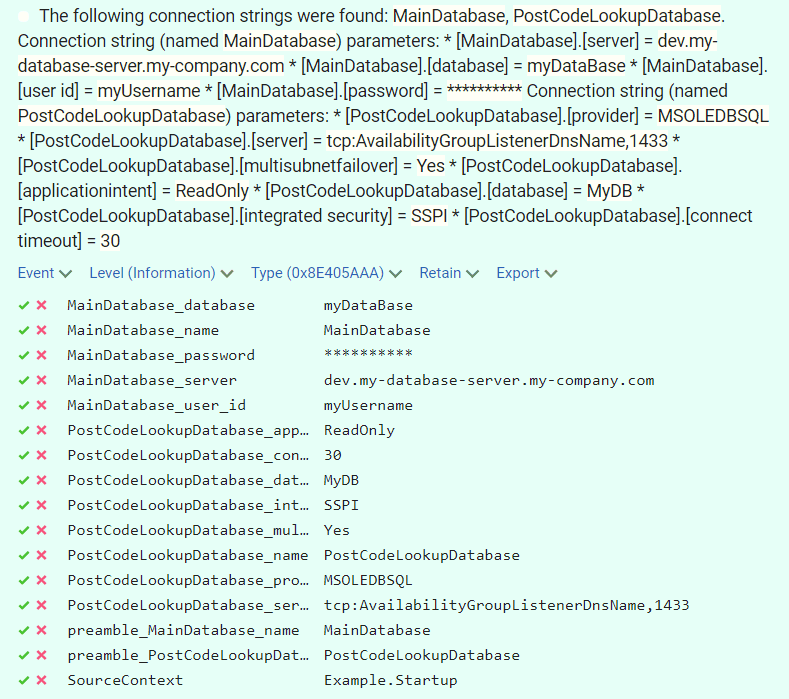
Note that Seq does not render the newlines in the message, however, it does render the structure values.
Alternative calls
logger.LogAllConnectionStringsAsInformation(IConfiguration config, ConfigurationDiagnosticOptions options = null)
logger.LogAllConnectionStringsAsDebug(IConfiguration config, ConfigurationDiagnosticOptions options = null)
logger.LogAllConnectionStringsAsTrace(IConfiguration config, ConfigurationDiagnosticOptions options = null)
Logging from an IDbConnection
logger.LogConnectionString(IDbConnection connection, LogLevel level, ConfigurationDiagnosticOptions = null)
Where:
loggeris theILoggerwhere you want the information logged.connectionis theIDbConnectionthat contains a Connection String to the database it connects to.levelis theLogLevelat which you wish the information to be logged.optionsare the options to use for logging. If not supplied then theConfigurationDiagnosticsOptions.GlobalOptionsare used.
Example Output
info: Stravaig.Extensions.Configuration.Diagnostics.Tests.ConnectionStringLogTests[0]
  Connection string parameters:
  * server = db0.my-host.com
  * database = myDatabase
  * user id = myUsername
  * password = [REDACTED]
Alternative calls
logger.LogConnectionStringAsInformation(IDbConnection connection, ConfigurationDiagnosticOptions = null)
logger.LogConnectionStringAsDebug(IDbConnection connection, ConfigurationDiagnosticOptions = null)
logger.LogConnectionStringAsTrace(IDbConnection connection, ConfigurationDiagnosticOptions = null)
Logging a given connection string
You can log a connection string directly, regardless of where it came from.
logger.LogConnectionString(LogLevel level, string connectionString, string name = null, ConfigurationDiagnosticOptions options = null)
Where
loggeris theILoggerwhere you want the information logged.levelis theLogLevelat which you wish the information to be logged.connectionStringis the connection string you want to decompose and log.nameis an optional parameter that names the connection string, such as a non-standard key into the configuration.optionsare the options to use for logging. If not supplied then theConfigurationDiagnosticsOptions.GlobalOptionsare used.
Example output
info: Stravaig.Extensions.Configuration.Diagnostics.Tests.ConnectionStringLogTests[0]
  Connection string parameters:
  * server = db0.my-host.com
  * database = myDatabase
  * user id = myUsername
  * password = [REDACTED]
Alternative calls
logger.LogConnectionStringAsInformation(string connectionString, string name = null, ConfigurationDiagnosticOptions options = null)
logger.LogConnectionStringAsDebug(string connectionString, string name = null, ConfigurationDiagnosticOptions options = null)
logger.LogConnectionStringAsTrace(string connectionString, string name = null, ConfigurationDiagnosticOptions options = null)